Looking for a perfect dining guide for browsing foods in Mandalay?


Food Directory
Food Directory

Looking for a perfect dining guide for browsing foods in Mandalay?
Mandalay Foodie is a dining guide for both locals & visitors in Mandalay, Myanmar.
This app intends to help people who are having a difficult time to find out what to eat and where to eat in Mandalay.

The app looks great on any device, any screen size.

This app can work for both Android and iOS mobiles.
You can download Mandalay Foodie App from both App Store and Play Store, for FREE.
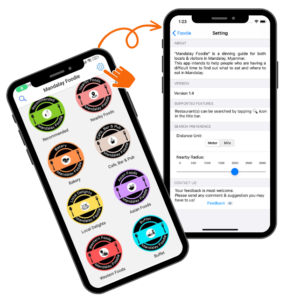
Users can easily browse the specific category of restaurants by tapping the icons in the home page.

Users can easily browse Recommended Restaurants by pressing this icon on the home page.

Users can easily browse Nearby Restaurants by pressing this icon on the home page.

Users can easily browse Bakery by pressing this icon on the home page.

Users can easily browse Café, Bar & PUB by pressing this icon on the home page.

Users can easily browse Local Delights by pressing this icon on the home page.

Users can easily browse Asian Foods by pressing this icon on the home page.

Users can easily browse Western Foods by pressing this icon on the home page.

Users can easily browse Buffet Restaurants by pressing this icon on the home page.
Mandalay Foodie is a dining guide for both locals & visitors in Mandalay, Myanmar.
This app intends to help people who are having a difficult time to find out what to eat and where to eat in Mandalay.
Users can browse the restaurants list by tapping the menu icons on the home page such as "Recommended", "Nearby Foods", "Bakery", "Café, Bar & Pub", "Local Delights", "Asian Foods", "Western Foods" and "Buffet".
Moreover, users are able to search for the restaurants either by restaurant name, food name or certain criteria by tapping search-icon in the title bar on the home page.
Your feedback is important to us.
Our team review the feedback every day. Your feedback with providing new shop information is highly appreciated. Please feel free to contact us to get more information or to provide information for new shop listings.
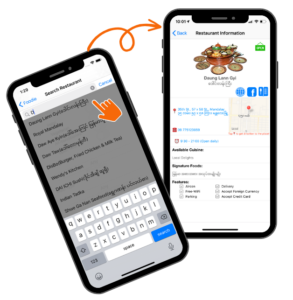
Users can search by either the restaurant name or the food name in the search box on the “Search Restaurant” page.
To search for a specific restaurant, users can simply type the restaurant name in the search box on the “Search Restaurant” page.
Users can also able to search for the restaurants by typing the desire food names.
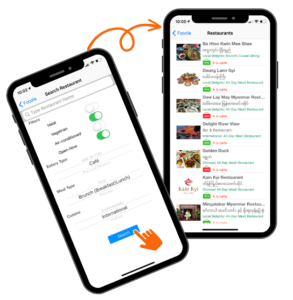
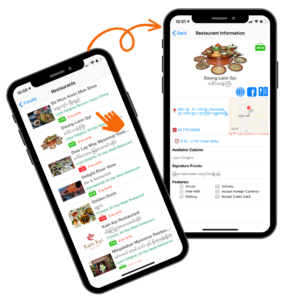
Users are allow to search the restaurants by various options.
To search for a specific restaurant, users can simply type the restaurant name in the search box on the "Search Restaurant" page.
To search for a specific food, users can simply type the food name in the search box on the "Search Restaurant" page.
Users are allowed to search for the nearby restaurants and can set the desire distance for nearby setting.
Users are allowed to set one or more criteria for each search.
Users are allowed to search for the restaurants which are currently opening.

Android and iOS versions are almost here. Stay Tune!